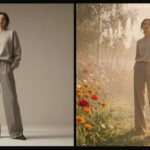
We tested four of the current open models side by side in ComfyUI: Z-Image Turbo, Flux 2 Klein, Qwen-Image 2.1 and Krea 2 Turbo.
This is a benchmark post, run the way we run a shoot. Xavier, our founder and creative director, has more than 20 years of advertising experience in motion and 3D, and he brings the same eye to a ComfyUI workflow: skin, hair, light, lens and how closely the image follows the brief. We ran the same prompts through each model and kept the settings visible in every screenshot, so you can see exactly how each image was made. We also cover the part most comparisons skip, which is whether each model’s licence actually lets you use the output for client work. For the video side of the same pipeline, see our LTX 2.5 vs MiniMax H3 image to video test.
The Four Models
Z-Image Turbo is a 6 billion parameter model from Alibaba’s Tongyi Lab. It is distilled to run in around eight or nine steps and is known for photoreal portraits and skin.
Flux 2 Klein is Black Forest Labs’ compact model family, released in January 2026 in a 4B and a 9B size. Both are distilled to finish an image in just 4 steps, which makes Flux 2 Klein the fastest renderer of the four. It also supports image editing as well as text to image.
Qwen-Image 2.1 is the newest of the four, released by Alibaba’s Qwen team on 20 September 2026. It is a 7 billion parameter model with native 2K output, strong text rendering, transparent backgrounds, and editing from up to ten input images.
Krea 2 Turbo is the 8-step distilled version of Krea 2, a 12.9 billion parameter model released as open weights in June 2026 and built with a strong focus on aesthetics.
How We Set Up the Test
Every image was generated locally in our own ComfyUI, the same privately hosted setup we use for client work. Each model ran on a text to image workflow, and the screenshots show the exact settings: model file, text encoder, resolution, steps and sampler. Click any image to see it clearer.
Z-Image Turbo ran at 2048 x 2048 with 9 steps. Qwen-Image 2.1 ran at 1440 x 1440 with 25 steps. Krea 2 Turbo ran at 1448 x 1448 for most tests and 1024 x 1024 for the male portrait. Flux 2 Klein ran at 2048 x 2048. Resolution is not identical across models, so compare composition, skin and prompt following rather than raw sharpness.
The Settings Behind the Look
Anyone can type a prompt into a AI generator. But getting a consistent, art-directed result from an open model is a craft, and it lives in a handful of settings that most people never touch. These are the ones we tune on every project.
Prompts written like a shoot brief
Our prompts read like a photographer’s call sheet, not a wish list: subject, pose, gaze, wardrobe, light direction, backdrop, lens and finish. Naming a 100mm lens at f/4 or a key light from the left gives the model a physical reference for compression, depth of field and shadow shape, and the results are far more predictable than adjectives like beautiful or cinematic.
CFG: how hard the model follows the prompt
CFG, or classifier-free guidance, sets how strongly the model is pushed toward the prompt. Distilled models such as Z-Image Turbo, Flux 2 Klein and Krea 2 Turbo are trained to run at a CFG of 1.0. Push it higher and colours oversaturate, contrast hardens and skin starts to look plastic. At 1.0 the negative prompt is also switched off, so any correction has to be written into the positive prompt. Qwen-Image 2.1 is not distilled, so it runs with real guidance, here at 2.0, where a negative prompt does have an effect.
Steps and distillation
Distilled models reach a finished image in very few steps: 9 for Z-Image Turbo in these tests, around 8 for Krea 2 Turbo, and 4 for Flux 2 Klein. Adding steps rarely helps them and can over-cook detail. Qwen-Image 2.1 needs more, and we ran it at 25. Getting this right is the difference between a quick draft pass and wasted render time on a deadline.
Sampler, scheduler and shift
We use the Euler sampler with the simple scheduler as our baseline for comparisons, because Euler is deterministic and predictable: the same seed and settings give the same image every time. Ancestral samplers add fresh noise at every step, which can be useful for variety but makes controlled revisions harder. On Z-Image Turbo we also set the model sampling shift to 3.0, which decides how much of the process is spent on overall composition versus fine surface detail.
Resolution and pixel budget
Each model has a pixel budget it was trained around. Generating far above it produces duplicated limbs and stretched anatomy, and generating far below it wastes detail. We set resolution by megapixels and aspect ratio rather than by guessing width and height, then upscale in the same workflow when a campaign needs a larger master.
Seeds, quantisation and repeatability
Every seed is recorded, so an approved image can be re-created exactly and changed one variable at a time when a client asks for a revision. On machines where Vram memory is tight we can run int8 quantised versions of the larger models, as with Qwen-Image 2.1 and Krea 2 Turbo here, and check that skin and hair detail survive before committing to them on a job.
Custom workflows, not presets
Because ComfyUI is node-based, each of these controls can be set per shot and saved as part of a workflow. The Krea 2 node in our screenshots, for example, has prompt enhancement and a LoRA slot switched off for a clean benchmark. On a brand project the same graph would load a LoRA trained on the product or character, so the look stays consistent across a whole campaign.
Test 1: Beauty Portrait
The first prompt is a skincare-style close-up: close-up beauty portrait, young East Asian woman, chin lifted, three-quarter view, gaze off camera, lips parted, dewy skin with fine visible texture, loose dark updo with flyaway strands, soft frontal diffused light, warm beige backdrop, 100mm f/4, editorial skincare. It tests skin texture, hair detail and whether the model can hold a specific pose and gaze.
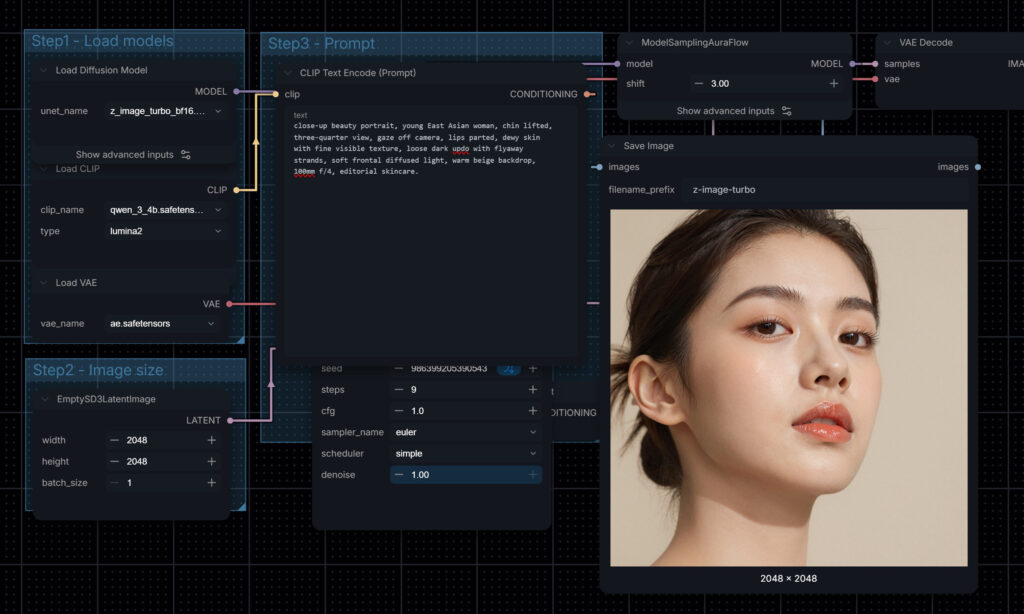
Z-Image Turbo gives a high quality result: a clean, retouched beauty-campaign look with a neat low updo, glossy lips and even light. The skin reads as dewy but smooth. If the brief is a finished skincare key visual, this is close to usable as it comes.
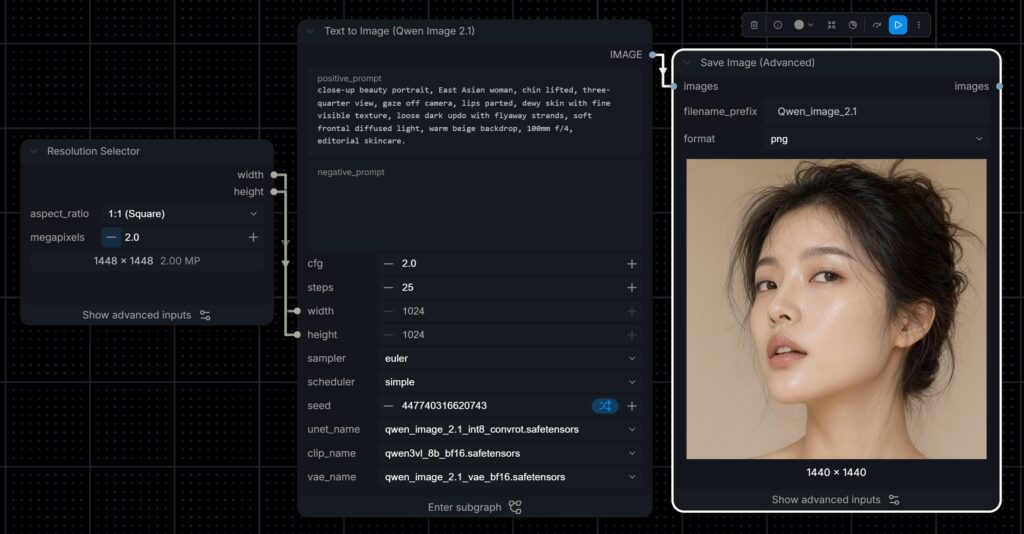
Qwen-Image 2.1 follows the loose updo and flyaway strands more literally, but messier, more editorial hairline and visible texture across the cheeks. The gaze on the eyes doesn’t look right.
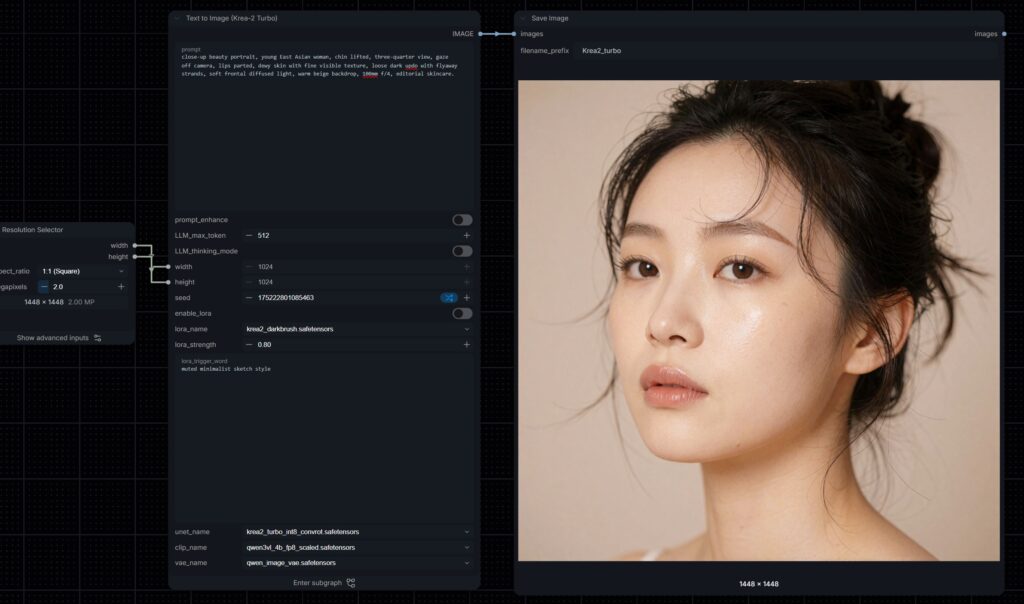
Krea 2 Turbo produces a natural person image of the three. Fine flyaways, natural highlights on the skin and a slightly filmic tone make it look shot rather than rendered. It is a strong editorial frame, for realism. ZImage and Krea 2 wins.
You will notice Flux 2 Klein is missing from the portrait tests. In our runs it did not handle East Asian faces well, so we left those results out. For a studio working with Singapore and regional brands, that is an important limitation to know before choosing a model.
Test 2: The Same Prompt With a Male Model
We swapped the subject to a young East Asian man and kept every other word of the prompt, including the loose updo. This shows how each model handles a detail that is less common for the subject.
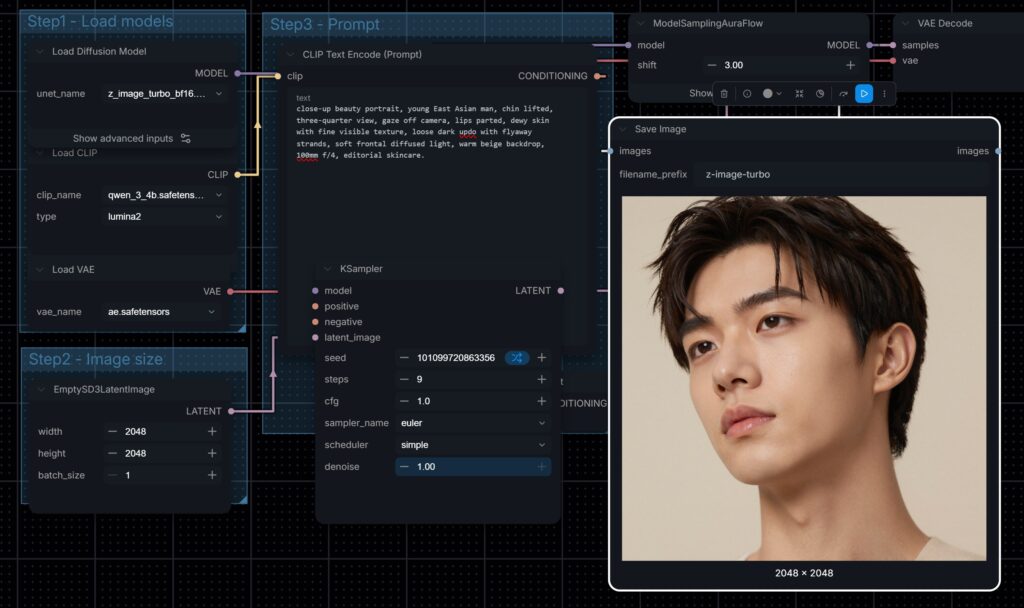
Z-Image Turbo gave a sharp, idol-style portrait.
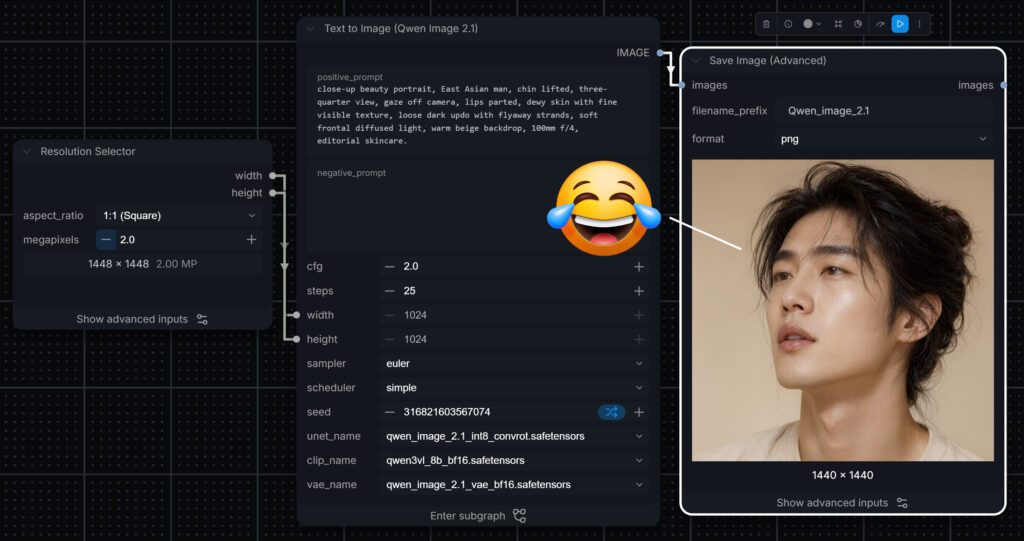
Qwen-Image 2.1 went for loose shoulder-length hair, but with the gaze of the eyes looking funny, like drunken.
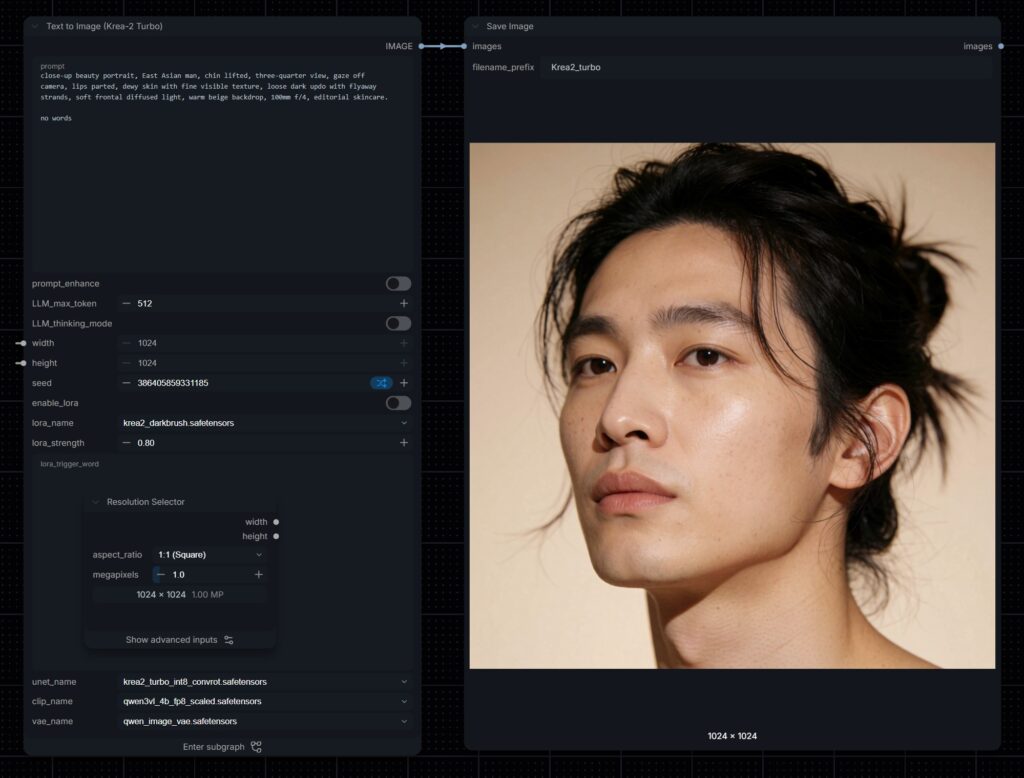
Krea 2 Turbo was the only model that tied the hair back with flyaway strands as asked, and it added the most skin detail, with pores and faint freckles, even at the lowest resolution in the test.
The missed updo is a good example of why CFG matters. Z-Image Turbo runs at a CFG of 1.0, so a negative prompt cannot fix it. The fix is in the wording: lead with the hair, describe it plainly as hair tied back in a loose bun, and drop competing styling words.
Across both portraits, Z-Image Turbo and Krea 2 Turbo were our picks for East Asian faces. Both give natural, consistent features from one generation to the next, which is what matters when the talent has to feel right for a Singapore or regional audience. Krea 2 Turbo follows fine prompt details more closely and gives real-looking people, with pores, freckles and natural imperfections. Z-Image Turbo gives flawless, heightened beauty, closer to a retouched K-beauty campaign. The choice comes down to whether the client wants extreme, idealised beauty or natural, believable people.
Z-Image Turbo at Full Resolution
Screenshots hide detail, so here are two Z-Image Turbo portraits at the full 2048 x 2048 output. Click to open them full size and look at the lashes, brows, lip texture and the fine hair at the hairline.
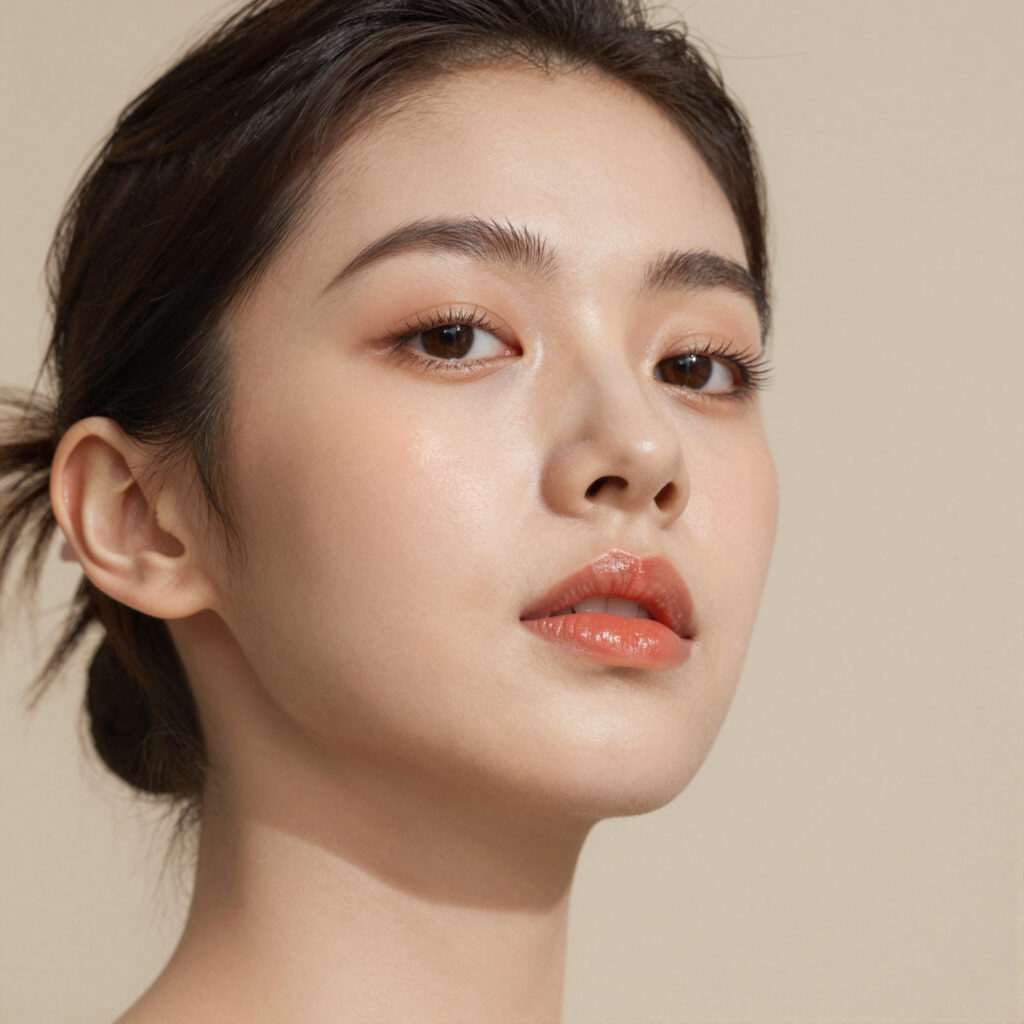
View full 2048 x 2048 image (opens in a new tab, click to zoom to 100%)
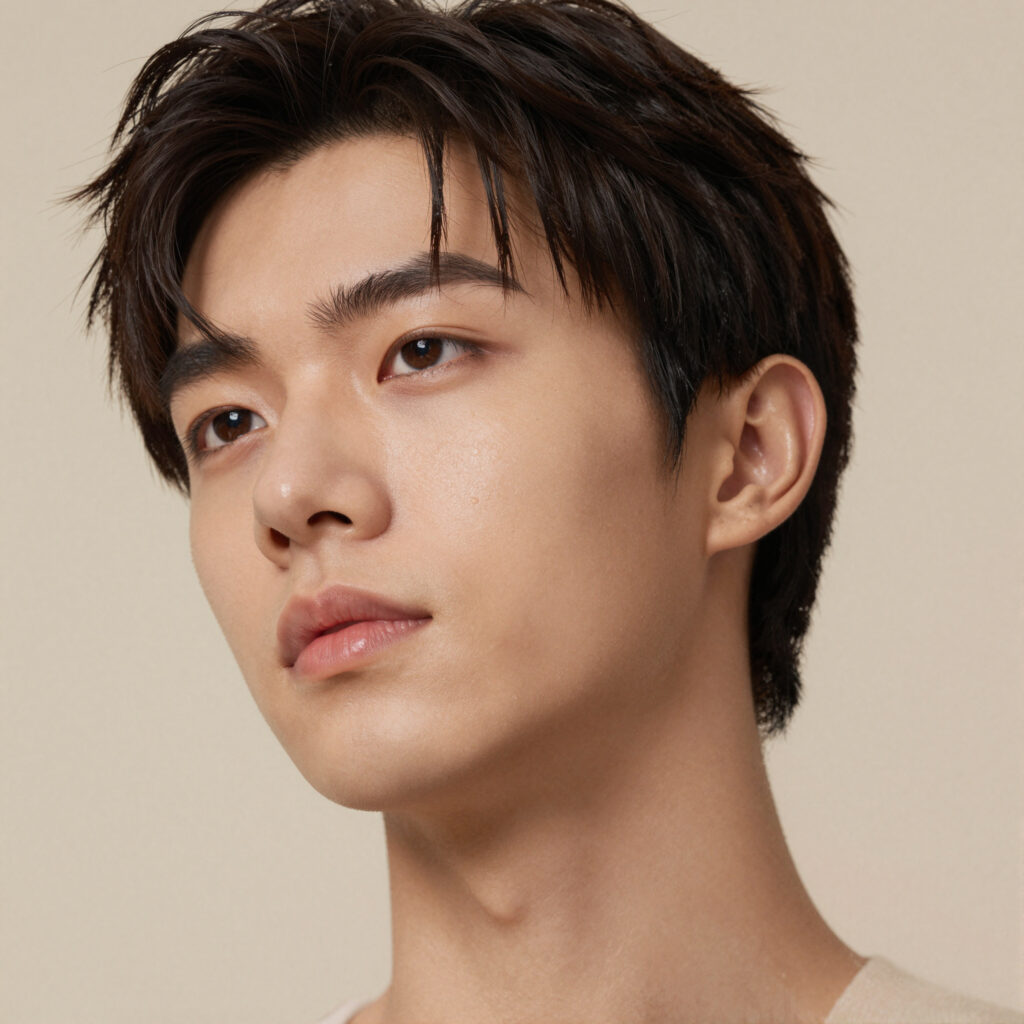
View full 2048 x 2048 image (opens in a new tab, click to zoom to 100%)
Test 3: Full-Body Fashion Shot
The third prompt moves to a catalogue brief: a confident model in a minimalist studio, full body, one hand in pocket, wearing Uniqlo-style basics of an oversized neutral knit and tailored wide-leg trousers, soft directional key light from the left, seamless beige backdrop, 85mm, muted earth tones and film grain. It tests anatomy, clothing drape and lighting direction. This is also where we compared Flux 2 Klein 4B with Flux 2 Klein 9B.
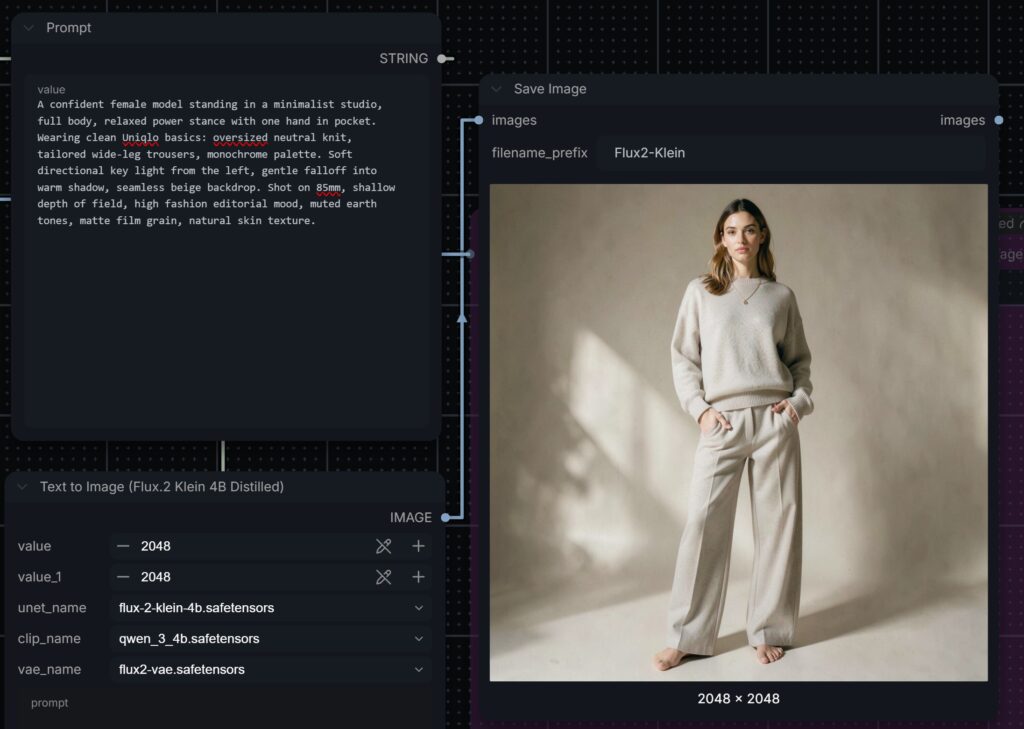
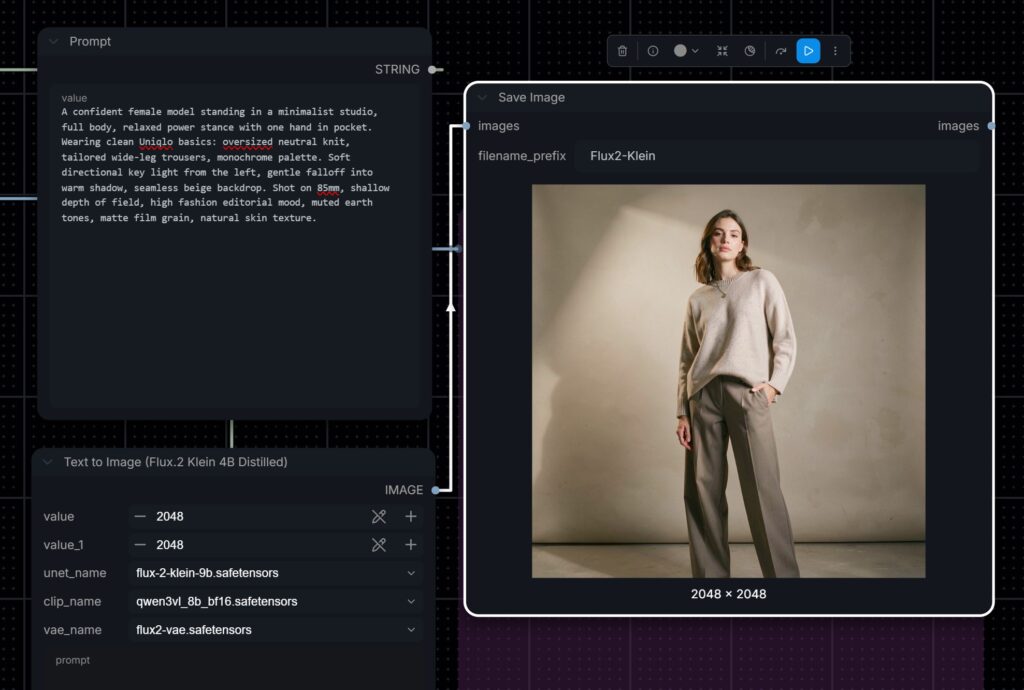
Flux 2 Klein 4B handled the lighting brief best of any model: a hard key from the left throwing a clear shadow shape across the backdrop. It put both hands in the pockets rather than one. The 9B model gave a warmer, softer image with cleaner tailoring and the correct single hand in pocket. With no ethnicity in the prompt, both Flux models defaulted to a European-looking model.
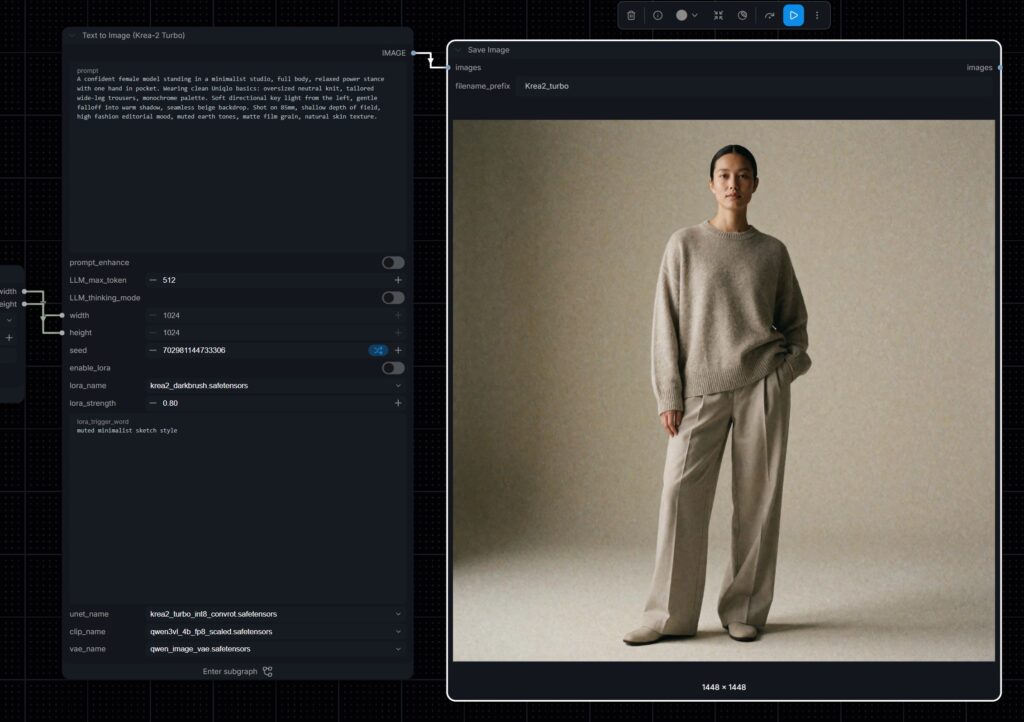
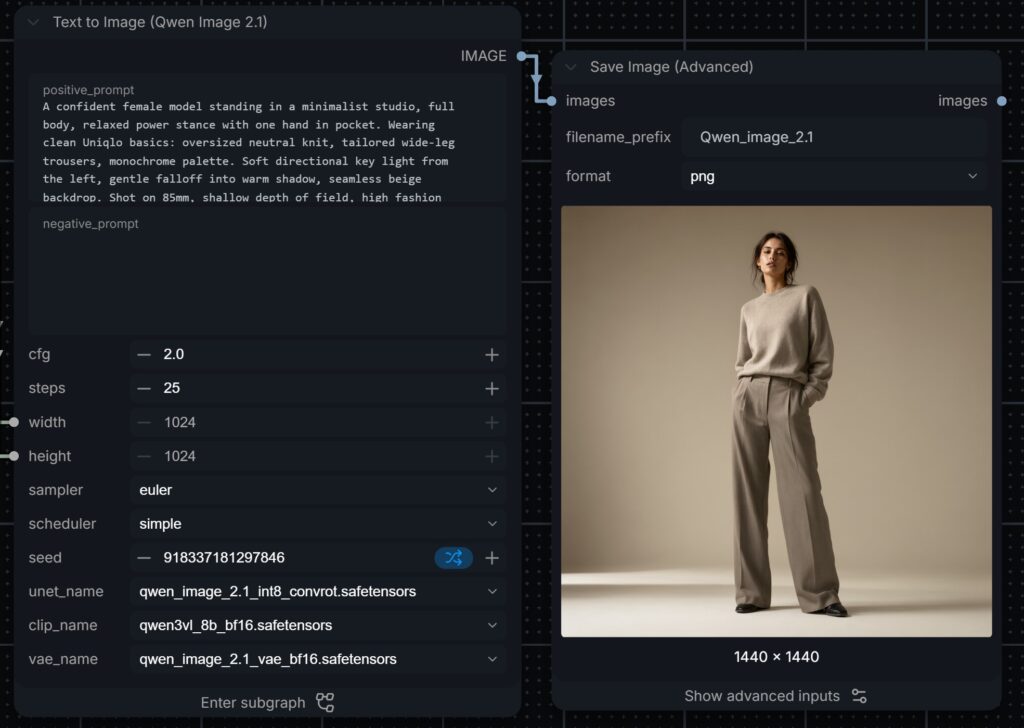
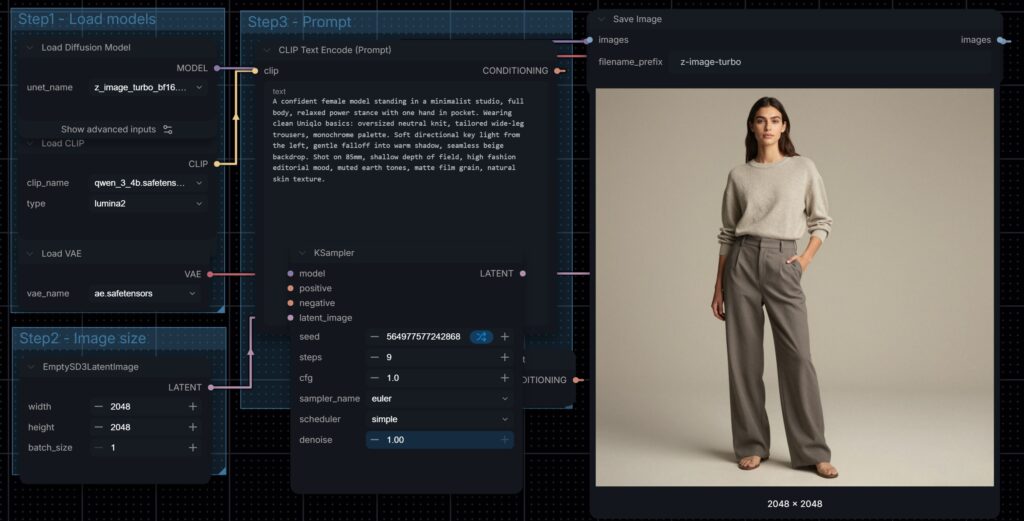
Krea 2 Turbo again looks the most like a real catalogue photograph, with visible knit texture, film grain and a natural stance. Qwen-Image 2.1 pushed toward high fashion, with a stronger pose and deeper shadows. Z-Image Turbo delivered a clean, evenly lit catalogue image that would drop straight into an e-commerce grid. We ran the same prompt with a male model on Z-Image Turbo to check consistency across a range.
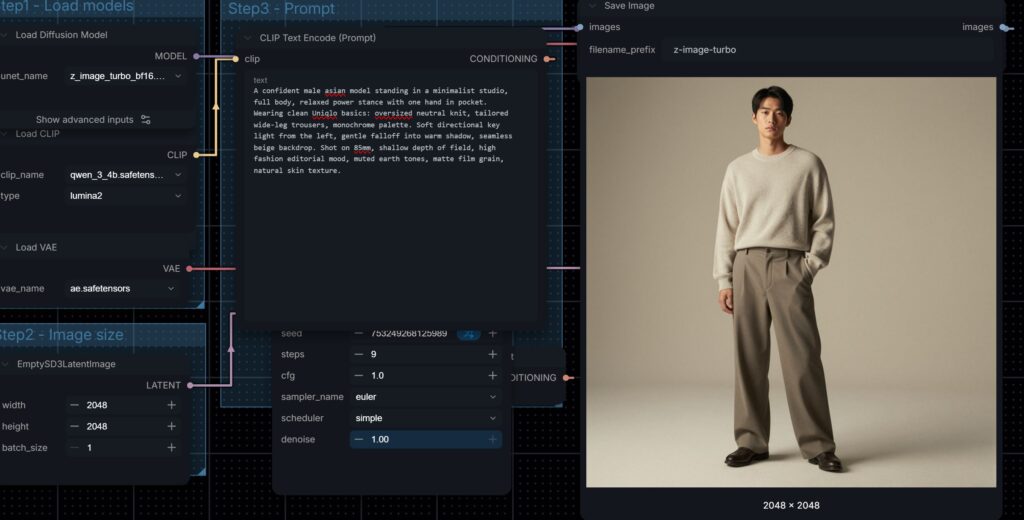
Licensing: What You Can Use for Client Work
For a brand, the licence matters as much as the image. Open weights do not automatically mean free commercial use, and the four models here sit under quite different terms.
Z-Image Turbo: Apache 2.0. Commercial use is allowed.
Flux 2 Klein 4B: Apache 2.0. Commercial use is allowed. Flux 2 Klein 9B is released under a non-commercial licence, so it cannot be used for client work unless you buy a commercial licence from Black Forest Labs. We ran 9B here purely as a benchmark against 4B.
Qwen-Image 2.1: released under the Qwen Research Licence, which covers non-commercial use only. Commercial use needs a separate licence from the Qwen team. This is a change from earlier Qwen-Image releases, which were Apache 2.0.
Krea 2 Turbo: released under the Krea 2 Community Licence, which allows free commercial use only for smaller organisations below a revenue and headcount threshold. Larger companies need an enterprise licence from Krea.
Licence terms change between releases, so check the current terms on each model’s official page before a project starts. On client jobs we confirm the licence for every model in the workflow at the brief stage, in the same way we clear music and stock footage.
Which Model for Which Job
Z-Image Turbo for East Asian faces, fast polished portraits and clean catalogue images, with a licence that is simple for commercial work. It is our default starting point and the overall winner for our kind of client work.
Krea 2 Turbo for the most natural, editorial look and the best prompt following on fine details, once the licence fits the client.
Flux 2 Klein 4B when speed matters most. It was the fastest model in our tests, which makes it ideal for rapid concept rounds, live art direction sessions with a client and large batches of variations. It also handled lighting direction well on product and fashion work, and the 4B version is commercially licensed. Test it on your subject first if the campaign features Asian talent.
Qwen-Image 2.1 for typography, transparent assets and multi-image editing, for internal concepts and mood boards until a commercial licence is in place.
Because everything runs in a privately hosted ComfyUI setup, we can mix these models inside one workflow, generate a key visual with one, refine it with another, and pass the result into AI video or our 3D animation pipeline. Our ComfyUI image editing post covers the editing side: combining reference images, relighting, changing product backgrounds, re-posing with a product and LoRA styles for a brand.
CRITICA is a Motion Design & Animation Studio based in Singapore that serves a broad spectrum of sectors, including Finance, Healthcare, Medical Science & Pharma, Technology, Hospitality, Tourism, Oil & Gas, and Renewables. Contact us to discuss a project you have in mind.

FAQ
Which is better, Z Image or Flux Klein?
In our ComfyUI tests Z-Image Turbo produced more polished portraits and handled East Asian faces well, while Flux 2 Klein 4B followed lighting direction best on a full-body fashion shot. Both 4B and Z-Image Turbo are Apache 2.0, so both can be used commercially.
Can I use Qwen-Image 2.1 for commercial work?
Not by default. Qwen-Image 2.1 is released under the Qwen Research Licence, which covers non-commercial use only. Commercial use needs a separate licence from the Qwen team.
Can Flux 2 Klein 9B be used commercially?
Not without a commercial licence from Black Forest Labs. Flux 2 Klein 9B is released under a non-commercial licence. The smaller Flux 2 Klein 4B is Apache 2.0 and can be used commercially.
Is Krea 2 free for commercial use?
Only for smaller organisations. The Krea 2 Community Licence allows free commercial use below a revenue and headcount threshold, and larger companies need an enterprise licence from Krea.
Which open image model is best for realistic portraits?
For East Asian faces our pick was Z-Image Turbo, which gave natural, consistent, polished portraits and is Apache 2.0 for commercial use. Krea 2 Turbo gave the most filmic editorial look, and Flux 2 Klein struggled with East Asian faces.
Can these image models run locally in ComfyUI?
Yes. Z-Image Turbo, Flux 2 Klein, Qwen-Image 2.1 and Krea 2 all have native ComfyUI support and run on local hardware, so images and briefs stay private.
What CFG value should I use in ComfyUI?
It depends on the model. Distilled models such as Z-Image Turbo, Flux 2 Klein and Krea 2 Turbo are trained for a CFG of 1.0, and higher values oversaturate colour and make skin look plastic. Undistilled models such as Qwen-Image 2.1 run with real guidance, around 2.0 in our tests, where a negative prompt also takes effect.
Which sampler is best for ComfyUI image generation?
We use Euler with the simple scheduler as a baseline because it is deterministic: the same seed and settings reproduce the same image, which makes client revisions controllable. Ancestral samplers add noise at each step and give more variety but less repeatability.